


Hey there busy dads! I’ve looked closely at PYTA by Ali Abdaal, and it really is a solid program. It’s structured, polished, and built for busy professionals who like clear systems. But in 2026, I’m seeing a lot of creators look elsewhere. Not because PYTA is bad, but because it doesn’t always fit their situation.
The price is a big factor. At $995, it’s not an easy yes, especially if you’re testing YouTube on nights or weekends. Some people also don’t want heavy accountability or rigid frameworks. Others care more about analytics and real-world data than scripting templates.
That’s why this guide compares four strong PYTA alternatives with 9–5 workers in mind. I focus on time commitment, cost, and structure, so you can see what’s realistic alongside work and family life.
Think Media is great if you want free, practical advice. VidIQ is ideal if you like making decisions based on data. Creator Now offers affordable paid training without the big commitment. Tube Mastery works best for creators ready to scale fast.
There’s a simple comparison table to make decisions quick. By the end, you’ll know which option fits your time, budget, and working style better than PYTA.
I like Think Media because it’s completely free and genuinely useful. No trial, no upsell pressure. Just hit play and learn. Sean Cannell and Benji Travis put out weekly videos on scripting, thumbnails, and growth, which makes it easy to test YouTube as a part-time thing without risking money.
They also have some solid downloads, like the Ultimate YouTube Thumbnail Guide and their hook tutorials. A lot of this overlaps with PYTA ideas, just without the clean packaging. The tradeoff is that everything is spread across hundreds of videos, so you have to pick what actually applies to your niche.
Time-wise, this works best if you’re self-directed. I’d expect closer to 10 hours a week between watching, experimenting, and tweaking. With PYTA, the path is clearer. Here, you’re digging through playlists and figuring out your own sequence.

It’s a great fit if you’re already disciplined. I’ve seen 9–5 folks do well by watching one video a night and applying it immediately. Parents especially seem to like batching thumbnails during nap time using Think Media’s free Canva templates.
The upside is fresh 2026 content and real feedback in the comments. The downside is no accountability. If you tend to jump between ideas or stall without structure, this can get messy fast.
If you’re curious, start with their “Film First Video” playlist tonight. Give it a month. You’ll build many of the same skills as PYTA, just without spending a dollar.
VidIQ is what I reach for when I want answers, not motivation. It’s all about analytics and optimization, and it shows. You get a Chrome extension plus training on keywords, competitors, and thumbnail testing. You can start free, then upgrade if it earns its keep. Pro is cheap, Boost is there if you want deeper forecasting and coaching.
What stands out is how fast you can spot opportunities. Daily idea reports, retention heatmaps, and SEO scores make it obvious which topics are worth your time.
This is very different from PYTA’s scripting-heavy approach. With VidIQ, you’re letting data tell you what to make next, which works great for niches like career advice or tutorials.
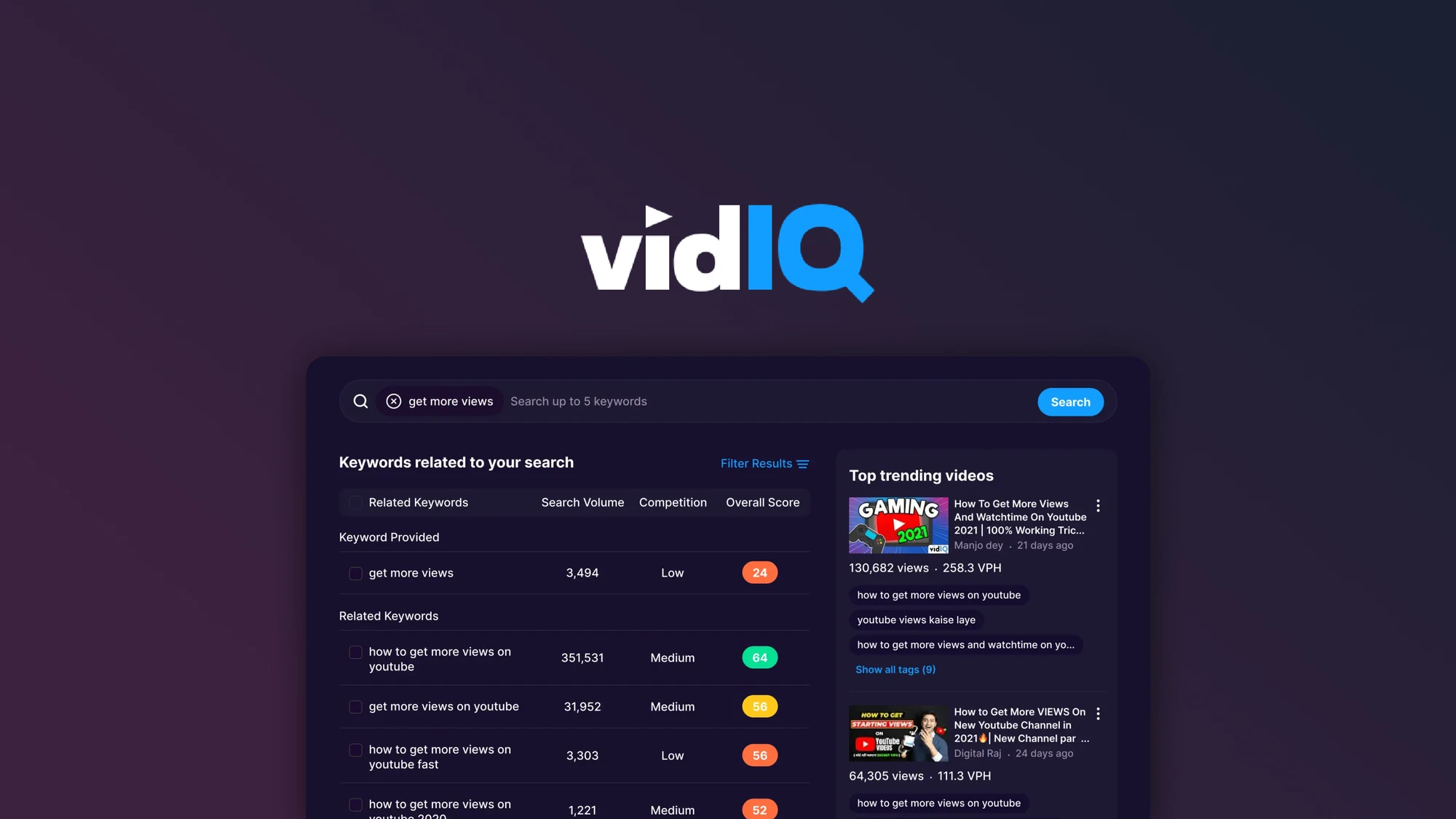
The time tradeoff is interesting. You’ll probably spend 3 to 4 hours a week digging into dashboards, but you save a lot of research time. I know people who check VidIQ over lunch, then write scripts in the evening with a clear plan.
This is a strong fit if you’re already comfortable filming and just want smarter topic selection. Marketers and SEO-minded folks usually do well here.
If spreadsheets make your eyes glaze over or you need help structuring videos, this may feel frustrating.
The big win is staying current with 2026 algorithm changes. The gap is production guidance, so pairing this with something like Think Media helps. There’s no hand-holding, so you have to stay self-motivated.
My advice is to install the free extension first and see if you actually enjoy using the data. If it clicks and the channel starts moving, upgrading makes sense.
Creator Now is the course I point people to when they want to move fast without overthinking it. Jordan Welch keeps things compact and practical, especially around faceless channels, Shorts, and light automation. It’s a one-time price, usually around $197 or less on sale, which makes it easier to justify than ongoing subscriptions.
The training is short by design, about 10 hours total. You get straight into hooks, simple scripting, Canva thumbnails, and how to outsource editing without building a team.
Jordan pulls examples from his own million-plus-subscriber channels, which works well for niches like finance tips or tech explainers. The templates help a lot when time is tight.
Compared to PYTA, this is less deep but faster to execute. I’ve seen people manage with 3 to 5 hours a week by focusing on one long video and repurposing it into Shorts. Tuesday night scripting, Friday repurposing. Very doable with a day job.
This is best if you’re past the total beginner phase and watching your budget. Side hustlers tend to see traction quickly if they follow the hooks. Parents especially like the faceless format since filming can be done in under 30 minutes.
The upside is current 2026 examples and a private community. The downside is you’ll outgrow it if you’re already advanced or want deep strategy work. It doesn’t replace PYTA’s long-term systems.
I’d pair it with free Think Media videos for editing polish. If you catch it on sale under $100, it’s a solid deal. Speed is the real value here, not completeness.
Tube Mastery is for when you’ve moved past dabbling and want to scale. This isn’t a “should I start YouTube?” course. It’s a “how do I grow this into something real?” program.
Matt Par charges a one-time $447 and teaches the systems he’s used across multiple million-subscriber channels, updated for 2026.
The course goes deep, around 20 hours of training. You’ll learn niche selection, keyword funnels, hiring editors, and building sponsorship pipelines.
There are swipe files for titles that rank and templates for hiring VAs, which saves a lot of trial and error. The focus is clearly on revenue and scale, not the hobby phase PYTA leans into.
The time commitment is heavier upfront. Expect 7 to 10 hours a week at first. The payoff is that once outsourcing kicks in, usually around week four, your personal workload drops closer to 3 hours a week just managing and reviewing.
This works best if you already have experience. Think 100-plus videos published and some idea of what performs. I’ve seen corporate professionals in finance niches hit their first $1,000 months fairly quickly by following the systems.
If you’re still figuring out scripting or hate managing people, this will feel overwhelming. It assumes you’re ready to delegate and think like an operator.
The big strength is the scaling blueprint. The downside is that beginners can get lost without a gentler ramp-up. I’d only use this part-time if the channel can support outsourcing costs.
Pairing it with VidIQ helps validate keywords before you go all in.
My advice is to watch Matt’s free case studies first. This program builds channels like businesses, not casual side projects.
When you’re busy, the tool matters less than the time you can actually give it. That’s the real deciding factor here.
If you’ve got zero budget but you’re disciplined, Think Media is the move. You’ll spend more time digging through free videos, and progress is slower without external pressure. But if you show up consistently, you’ll build the same core skills PYTA teaches.
If you like numbers and only have about three hours a week, VidIQ tends to click. I’ve seen people plan videos during commutes just by scanning keyword ideas. Pair that with simple phone filming and you can grow faster than guessing blindly.
If your budget is under $200 and speed matters, Creator Now is hard to beat. It cuts out the fluff and works especially well for faceless channels. Parents love this because filming is quick, and monetization usually comes sooner than free routes.
If you’re ready to outsource and think bigger, Tube Mastery is the scaling option. The first few weeks take serious time, but once editors are in place, it turns into oversight work.
This only makes sense if you already have a decent backlog, think 100 videos or so.
Here’s the shortcut I use. If you can commit five or more structured hours and like courses, stay close to PYTA-style programs. If you’re under four hours a week or hate rigid systems, VidIQ or Think Media will feel lighter.
Whatever you choose, test it with one video. Give it four weeks, watch retention, and be honest about results. Most 9–5 creators don’t fail because of the tool. They fail because the tool doesn’t match their reality.
Here’s the stack I’d use if I wanted momentum fast without spending a cent. No excuses, no waiting for the “right” course.
Start with a free H.I.V.E.S script template. Just search for a free H.I.V.E.S framework PDF. It gives you structure, hooks, and retention beats similar to PYTA. You don’t need the course to practice the format.
Next, install TubeBuddy’s free tier. It’s not flashy, but the tag suggestions and basic thumbnail A/B testing easily save a couple hours of guessing each week. That alone adds up fast when you’re tired after work.
For thumbnails, Canva’s YouTube templates are more than enough. Drag, drop, bold text, faces if it fits your niche. I’ve seen CTR jump just by cleaning things up here. No design background needed.
Editing is where people overthink. Pick Filmora or CapCut and follow free Think Media tutorials. Give yourself one focused weekend and you’ll comfortably cut clean 8-minute videos. Done beats fancy.
Then study MrBeast hook breakdowns on YouTube. Not to copy the style, but to understand pacing. Apply those ideas to your first 15 seconds and watch retention improve. It’s uncomfortable at first. It works anyway.
The real power is stacking. Use VidIQ for keywords, Think Media for hooks, Canva for batching thumbnails. Batch four videos on a Sunday. Track ideas and results in a simple Google Sheet.
Honestly, this gets you about 70 percent of what most paid courses offer. I’ve seen busy professionals hit 500 subscribers in three months doing exactly this. Not because it’s magic. Because it fits real life.
If I’m being honest, there’s no single “best” option here. It comes down to how much time, energy, and patience you actually have after work and life stuff are done. Courses don’t fail people. Mismatched expectations do.
If you like structure and accountability, PYTA or something close to it makes sense. If money is tight but discipline isn’t, free stacks like Think Media plus basic tools will still get you moving. If you’re short on time and like letting data guide you, VidIQ earns its spot. And if you’re already serious and ready to delegate, Tube Mastery can change the trajectory fast.
What matters most is picking one path and sticking with it long enough to learn something real. One video a week, tracked honestly, beats bouncing between tools and hoping for shortcuts. I’ve seen busy 9–5 creators grow by keeping things boring and consistent.
Start simple. Ship one video. Review it after four weeks. Adjust based on reality, not motivation. That’s usually where momentum actually comes from.
Disclosure: I may receive affiliate compensation for some of the links below at no cost to you if you decide to purchase a paid plan. You can read our affiliate disclosure in our privacy policy. This site is not intending to provide financial advice. This is for entertainment only.


